Why AI Can't Spell Text in Images — And Why It's So Hard to Fix

Mar 1, 2026

Short answer: AI image generators struggle with text rendering because diffusion models generate pixel patterns, not letters. They have no concept of individual characters, no way to enforce spelling accuracy, and no clean bridge between language understanding and pixel placement. These are architectural limits, not bugs.

Below, we explain each mechanism in detail, why small text fails more than headlines, and why the same prompt produces different spelling errors every time.

You type a careful prompt. You specify the exact words you want. The image comes back looking incredible — the lighting, the composition, the color palette, all surprisingly good. Then you look at the text. "COFFE SHPO." Two words, two errors. Distorted letters, broken fonts, warped characters where clean typography should be.

This is one of the most common complaints among people who use AI image generators regularly. Faces are more realistic, hands have the right number of fingers, styles are more controllable — but text remains stubbornly unreliable. The question worth asking is not "when will this be fixed" but "why is this so hard in the first place."

Why AI Misspells and Distorts Text: Common Misconceptions

When people encounter garbled text in AI-generated images, the first instinct is to assume the model just needs more training data. Show it more examples of text in images, and it will learn to spell. This sounds reasonable, but it misses the point.

Others assume the model simply does not understand language. But modern image generators are built on top of large language models that absolutely do understand language. GPT-4, Gemini, Claude -- these systems can write essays, solve logic puzzles, and generate syntactically perfect code. The language comprehension is there. The problem is not understanding. The problem is rendering.

The real explanation involves three distinct structural challenges that operate simultaneously. Each one alone would make text difficult. Together, they make reliable text rendering one of the hardest unsolved problems in generative AI. What users perceive as random misspellings or text artifacts are actually failures of text rendering reliability -- systematic weaknesses in how these models translate language into visual space.

Pixel Distributions vs. Symbol Precision

Most modern AI image generators are built on diffusion models. A diffusion model works by learning the statistical distribution of pixels in images. During training, it sees millions of images and learns patterns: what pixel arrangements look like a dog, a sunset, a human face. During generation, it starts from random noise and gradually refines it into an image that matches those learned patterns.

This works remarkably well for natural imagery. A photograph of a mountain does not need to be pixel-perfect to look like a mountain. If the snow line is a few pixels higher or lower, the image still reads correctly. Natural images have enormous tolerance for variation.

Text operates under completely different rules. Text is a symbolic system where precision is not optional. The difference between "m" and "rn" is a few pixels. The difference between "d" and "cl" is a subtle curve. The difference between "I" (capital i) and "l" (lowercase L) can be a single serif. In text, a variation of two or three pixels can change the meaning entirely or produce something unreadable.

Think of it this way. If you ask someone to paint a forest from memory, minor inaccuracies in individual leaves will not matter. The forest will still look like a forest. But if you ask that same person to write out a phone number from memory, a single wrong digit makes the whole thing useless. That is the fundamental tension: diffusion models are memory-painters being asked to produce phone numbers.

The model is not choosing letters and arranging them. It is generating pixel patterns that statistically resemble text it has seen before. Sometimes those patterns happen to land on the correct letters. Sometimes they land close but not quite right, producing unreadable text or inconsistent typography that looks almost correct at a glance but falls apart on closer inspection. The model has no internal concept of "this is the letter A and it must look exactly like this." It only knows "pixels in this region should form shapes that look roughly like what I have seen in similar contexts."

Resolution Limits and Text Information Density

The second problem is more subtle but equally important. It concerns the relationship between image resolution and the information density of text.

A 1024x1024 image contains about one million pixels. That sounds like a lot, but consider what happens when text is part of the image. A single line of text reading "GRAND OPENING SATURDAY" contains 22 characters. For each character to be legible, it needs a certain minimum number of pixels -- roughly 10-15 pixels in height for basic readability, more for decorative fonts. But the text is only one element in a larger composition that also includes background imagery, objects, lighting, and color.

During the diffusion process, the model must simultaneously reconstruct all of these elements from noise. The denoising steps operate across the entire image, and the model must allocate its "attention" and reconstruction accuracy across everything in the frame. Visual elements like backgrounds and objects can tolerate some softness during intermediate steps because they will still look correct when fully resolved. Text cannot. A letter that is slightly soft at an intermediate step may resolve into the wrong letter by the final step.

This creates a fundamental resource allocation problem. The diffusion process optimizes for overall image quality -- the statistical likelihood that the full image looks correct. Since text occupies a small fraction of the total pixel area but demands disproportionately high precision, the optimization process can easily trade text accuracy for improvements elsewhere in the image. The model is not making a conscious choice to sacrifice text quality. It is following gradients that favor global coherence, and text precision is a local detail that those gradients underweight. This is why AI image generator text quality often lags behind overall visual realism -- the system is literally optimized for the wrong thing when it comes to text.

This also explains why larger text tends to render more accurately than smaller text. Larger text occupies more pixels, giving the diffusion process more room to get the shapes right. Small text -- a tagline at the bottom of a poster, fine print on a product label -- compresses the same symbolic precision requirements into fewer pixels, making errors more likely. This is why AI-generated posters with text errors so often have the headline correct but the subtitle garbled: the headline had enough pixel budget, and the subtitle did not.

The Token-to-Pixel Bridge Problem

The third challenge is perhaps the most fundamental. It concerns the structural gap between how language models process text and how image models process visual space.

When you write a prompt like "a poster with the text HELLO," the language model that processes your prompt breaks it into tokens -- roughly words or subwords. The model understands, at the language level, that H-E-L-L-O is a five-letter word with specific characters in a specific order.

But this understanding exists in a completely different representational space than the image. The language model works in an abstract embedding space where "HELLO" is a point in a high-dimensional vector. The image model works in pixel space where "HELLO" is a specific arrangement of dark and light regions on a two-dimensional grid. Going from "I know this word has these letters in this order" to "I will place these exact pixel patterns in this exact spatial arrangement" is a cross-modal translation problem with no clean solution.

Current architectures handle this bridge through cross-attention, where the image generation process attends to text embeddings from the language model. But cross-attention is a soft, probabilistic connection. It allows the image model to be influenced by the text representation, but it does not enforce character-level accuracy. The image model receives a general signal about what text should appear, not a rigid template of exactly which pixels should be on or off.

Consider an analogy. Imagine you are on the phone with someone, trying to describe how to draw a specific word using only verbal descriptions of shapes. "Start with two vertical lines connected by a horizontal bar in the middle" for the letter H. This would be painfully slow and error-prone, even though both parties understand the letter H perfectly well. The problem is not comprehension. The problem is that the communication channel between the language representation and the spatial representation is lossy and indirect. That is roughly what happens inside these models at the token-to-pixel interface -- and it is why even models with excellent language understanding produce random extra characters, letters merging together, and broken font shapes in their output.

Common AI Text Rendering Problems

These three structural challenges do not produce a single type of failure. They manifest as a range of specific, recognizable problems that anyone who has used AI image generators will have encountered. Misspelled words are the most obvious -- characters swapped, dropped, or substituted in ways that make no linguistic sense. But there are others: blurry or unreadable letters where the diffusion process failed to fully resolve character shapes; letters merging together into ambiguous blobs; incorrect or missing punctuation; random extra characters appearing where none were requested; inconsistent font shapes within the same word, where some letters look crisp and others look warped; and text that drifts out of its intended position.

Each failure mode traces back to the mechanisms described above. Misspelled words and random characters typically originate from the token-to-pixel bridge -- the model received a semantic signal about what to write but failed to translate it into the correct spatial arrangement. Blurry and merged letters are usually resolution and density failures. Inconsistent typography and warped characters reflect the tension between probabilistic pixel generation and the deterministic requirements of symbolic text.

These are not bugs. They are predictable consequences of the architecture. For a focused explanation of why AI misspells text in images, including why the same prompt produces different errors each time, see our companion article.

This framework also answers several questions that come up repeatedly. Why does AI sometimes add extra letters? Because the token-to-pixel bridge introduces noise in the character sequence, and the diffusion process fills in plausible-looking but incorrect shapes. Why is small text blurrier than large headlines? Because small text has fewer pixels to work with, and the denoising process cannot resolve fine details at that scale. Why does the same prompt produce different spelling errors each time? Because the generation process starts from random noise, and the path from noise to final image is stochastic -- slight differences in the starting point cascade into different text outcomes.

Why AI Text Rendering Problems Persist

Understanding these three structural challenges makes it clear why text rendering improvements have been gradual rather than sudden. Each challenge is rooted in the fundamental architecture of how these models work, not in a simple bug or insufficient training data that could be fixed with a software update.

Improvements are happening. Larger models with higher resolution output have more pixels for text. Better cross-attention mechanisms improve the token-to-pixel bridge. Some architectures are experimenting with hybrid approaches that use dedicated text rendering pipelines separate from the main diffusion process.

But the core tension remains. Diffusion models are probabilistic systems optimized for perceptual quality. Text is a deterministic symbolic system that demands exact correctness. Reconciling these two paradigms is not a matter of scaling up existing approaches -- it requires architectural innovation that is still actively being researched.

Each generation of models gets somewhat better at text. But the expectation that text rendering will suddenly become perfectly reliable with the next model release misunderstands the nature of the challenge. This is a category of problem where improvement is incremental, not transformative.

The same architectural limitations also appear in other generative media. AI video generation models face an even harder version of this problem — rendering readable text inside moving scenes, animated overlays, or dynamic subtitles requires maintaining character-level precision across multiple frames. For creators experimenting with video generation, this Seedance prompt library provides a useful collection of prompts for different video styles.

Model Differences in Text Rendering Quality

Not all models handle text equally. Differences in architecture, training data composition, resolution, and cross-attention implementation lead to meaningful variation in text rendering quality across different AI image generators.

Some models perform better with short text but degrade sharply with longer strings. Others maintain moderate quality across different text lengths but never achieve the crisp precision needed for professional use. Some models are more sensitive to how text is specified in the prompt — whether you use quotation marks, capitalization, or explicit font descriptions. For specific examples, see our text rendering compared to DALL-E and how Midjourney handles text rendering vs alternatives.

Perhaps more important than peak performance is consistency. A model that renders text correctly 80% of the time for a given prompt type is more useful than one that renders it perfectly 60% of the time but fails badly the other 40%. Predictability matters. When you are generating images for a specific purpose -- a social media graphic, a logo concept, a product mockup -- you need to know in advance whether the text will be usable or whether you will need multiple attempts and manual corrections.

This consistency dimension is often overlooked in model comparisons that focus on cherry-picked best results. The question is not "can this model produce an image with correct text" but "how often does it produce correct text under typical usage conditions."

What Text Rendering Reliability Really Means

This brings us to a concept that deserves more attention in how people evaluate AI image generators: text rendering reliability.

Reliability, in this context, means more than just accuracy. It encompasses several properties: Does the model spell words correctly? Does it maintain legibility across different font sizes? Does it handle punctuation and special characters? Does it position text where you asked it to be placed? And critically, does it do all of these things consistently, not just occasionally? In other words, text rendering reliability is a measurable property -- not a subjective impression -- and it can be tested systematically across prompt types, text lengths, and languages.

Most discussion about AI-generated text focuses on capability -- whether a model can render text at all. But capability without reliability has limited practical value. If you need to generate 20 social media graphics with text, and the model gets the text right on 15 of them, you still have to manually fix or regenerate the other 5. The effective utility depends on the reliability rate, not the theoretical capability.

As models improve, reliability will likely become the primary differentiator for text-heavy use cases. The question going forward is not which model can produce the best single example of text rendering, but which model produces acceptable text most consistently across realistic scenarios.

In testing different models for text-heavy tasks, we have found that consistency and predictability matter far more than occasional perfect results. For text-heavy workflows, reliability testing across dozens of prompts is far more informative than looking at a single perfect demo image. This observation has shaped how we evaluate and select the underlying models for our own image generation pipeline.

What This Means for Users

None of this is to say that AI-generated text is useless. For many practical purposes -- logo concepts, poster drafts, social media mockups -- current text rendering is good enough to be genuinely useful, especially for short text of one to five words. The key is understanding the boundaries.

Short, prominently placed text in a common language has the best chance of rendering correctly. Fewer characters mean less symbolic precision required, prominent placement means more pixels allocated, and common language means more training data for those patterns.

Long text, small text, unusual characters, and non-Latin scripts remain challenging for the reasons outlined above. These are not arbitrary limitations but direct consequences of how the underlying technology works. Knowing this lets you make informed decisions about when to rely on AI-generated text and when to plan for manual post-processing.

The models will keep getting better. But improvement will be measured in reliability percentages, not in a sudden leap to perfection. As generative systems become more widely used in professional workflows, reliability will matter more than raw visual impressiveness. Understanding why is the first step toward using these tools effectively. If you want to see the current state firsthand, you can test text accuracy in AI-generated images yourself.

Real Examples of AI Text Rendering Failures

The problems described above are not theoretical. Below are three images generated by an AI image model using prompts that explicitly specified the exact text to render. Each prompt contained correctly spelled words in clear English. The model produced visually compelling images -- but the text is garbled, misspelled, or distorted in every case.

These examples demonstrate the core failure modes: long words get letters swapped or dropped, small text becomes unreadable, and multi-line text accumulates errors across each line. The model is not choosing wrong spellings -- it is generating pixel patterns that statistically resemble text without enforcing character-level accuracy.

AI generated newspaper with misspelled headline text showing diffusion model text rendering errors
Prompt asked for "UNPRECEDENTED ARCHAEOLOGICAL DISCOVERY IN MEDITERRANEAN" — the model produced "UNPPREDENTED ARCHAELIOGICAL DISOVERY IN MEDITERRNAEN." Every long word is misspelled.
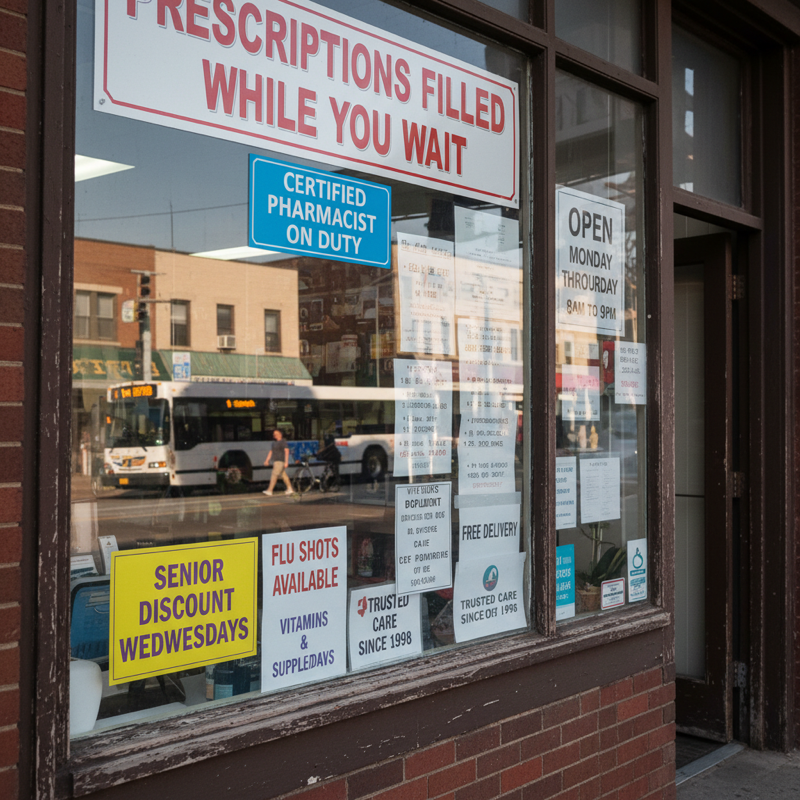
AI generated pharmacy storefront with garbled and distorted small text on window signs
A pharmacy window with multiple text elements. Larger signs are mostly correct, but smaller text becomes garbled — "WEDNESDAYS" renders as "WEDJWESDAYS."
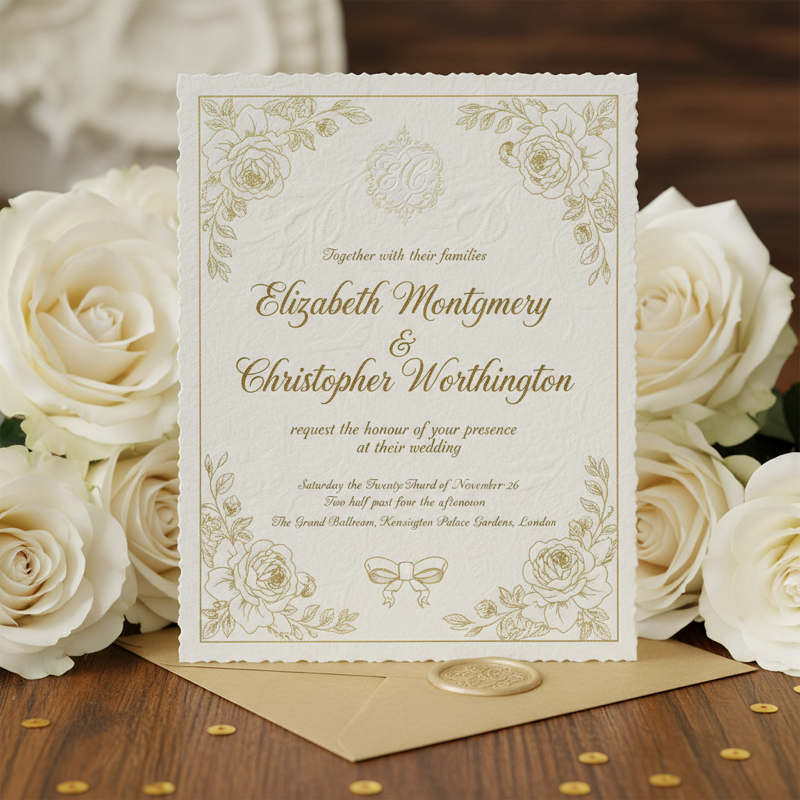
AI generated wedding invitation with misspelled names and distorted calligraphy text
A wedding invitation where "MONTGOMERY" becomes "MONTGOMREY." The calligraphy style looks elegant, but the model dropped and rearranged letters in the names.

These examples show a common pattern in AI text rendering. Diffusion models can reproduce the visual appearance of letters, but they consistently fail to maintain exact spelling across longer words, smaller text, or multiple text elements in the same image. The errors are not random -- they follow the structural limitations described above: the pixel distribution problem causes letter-level inaccuracies, the resolution limit makes small text unreadable, and the token-to-pixel bridge loses character sequence information for longer words. Understanding why AI misspells text in images is the first step toward working around these limitations.

How to Improve Text Accuracy in AI Images

While no technique guarantees perfect text rendering, several strategies consistently improve results. The most reliable approach is to keep text short -- one to three words at most. Short text gives the model fewer characters to get wrong and more pixel budget per letter.

Make the text large and centered in the composition. Text that occupies a significant portion of the image gets more attention during the denoising process, reducing the chance of garbled or blurry characters. High-contrast combinations like white text on a dark background or black text on white also help, because they give the model clearer pixel boundaries to resolve.

Specify the exact text in quotation marks in your prompt, and avoid requesting multiple text elements at different sizes in the same image. If you need a headline and a subtitle, generate them separately.

Finally, generate multiple variations of the same prompt. Because each generation starts from different random noise, some runs will produce correct text while others will not. Generating three to five variations and selecting the best result is often faster than trying to engineer a single perfect prompt. For more detailed techniques, see our prompt engineering guide for better text accuracy.

If your goal is to create AI images with text that actually renders correctly, try the Nano Banana Studio AI image generator. It's designed for posters, logos, and product graphics where text clarity matters.

Frequently Asked Questions

Why does AI add extra letters to words in images?

The token-to-pixel bridge introduces noise in the character sequence. The diffusion process fills in plausible-looking but incorrect letter shapes, sometimes adding characters that were never in the prompt.

Why does the same prompt spell words differently every time?

Generation starts from random noise. Slight differences in the starting point cascade into different text outcomes, so the same prompt produces different misspellings on each run.

Why is small text worse than large headlines in AI images?

Larger text occupies more pixels, giving the denoising process more room to resolve letter shapes. Small text compresses the same precision requirements into fewer pixels, making errors more likely. See our AI text rendering test results across models for specific examples.

Does putting text in quotes help AI spell it correctly?

Quotes can signal emphasis to the language model, but they do not fix the underlying token-to-pixel bridge problem. Results vary by model — see prompt engineering techniques for better text accuracy.

Which AI models are most reliable for text in images?

Reliability varies. The only honest way to evaluate is to test across many prompts — short text, small text, punctuation, multiple languages. Consistency matters more than occasional perfect results.

Why do AI-generated posters have unreadable text?

Posters combine multiple text elements at different sizes. The diffusion process optimizes for overall image quality, underweighting the local precision that text demands — especially for smaller subtitle text.

Will AI text rendering get better?

Yes, incrementally. Each model generation improves, but the core tension between probabilistic pixel generation and deterministic text precision requires architectural innovation, not just scaling.

Why do diffusion models fail at rendering text?

Diffusion models generate images by learning statistical pixel patterns, not by placing individual letters. Text requires exact pixel arrangements where a difference of 2-3 pixels changes one letter into another. The denoising process optimizes for overall image quality, not character-level precision.

Why can't AI generate accurate text in images?

AI understands spelling at the language level but cannot translate that understanding into exact pixel placement. The bridge between the language model (which knows how to spell) and the image model (which places pixels) is probabilistic and lossy — it transmits meaning, not letter-by-letter instructions.

Why is AI-generated text on posters often unreadable?

Posters combine headlines, subtitles, and fine print at different sizes. The diffusion process allocates its reconstruction accuracy across the entire image. Large headlines get enough pixels to render correctly, but smaller text gets compressed into too few pixels, producing blurred or garbled characters.


This article reflects our understanding of current generative AI architectures as of early 2026. The field is evolving rapidly, and specific model capabilities change with each release.

Nano Banana Studio Team

Nano Banana Studio Team